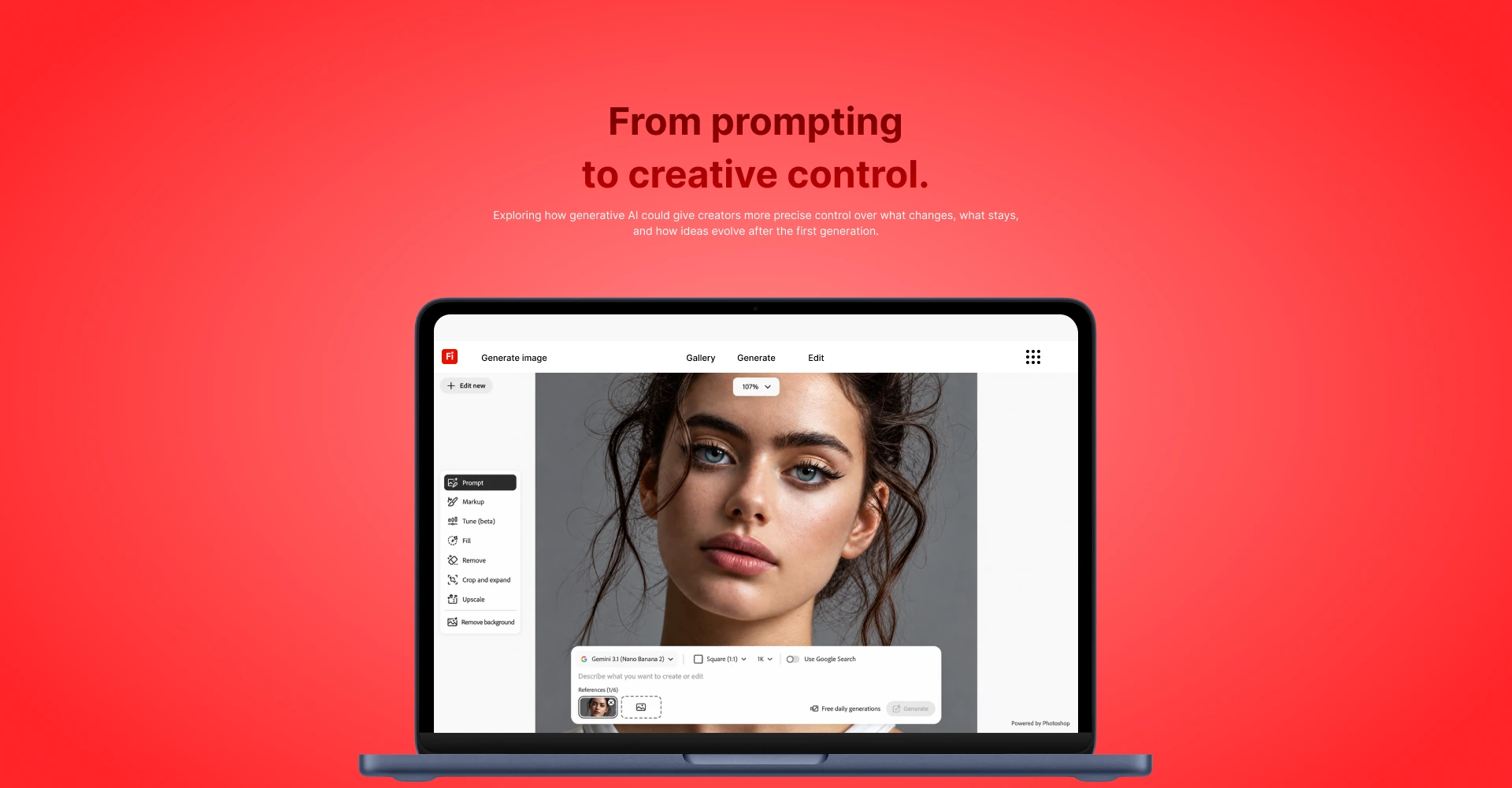
Adobe Firefly — From prompting to creative control, shown on a laptop
Contract · Product Design Post-generation editing 8–10 min read

From prompting
to creative control.

Firefly could generate a strong image in seconds. Changing one part of that image without losing the rest was still the hardest thing a creator could ask it to do. This is the work I did on that problem.

Role
Product Designer
Product
Adobe Firefly
Focus
Generative AI · Image & Video Editing · Creative Tools
Timeline
May 2025 — Present · Contract
Contribution
Post-generation editing & creative control

In short

Refinement, not regeneration.

The problem

When a generation was close but not right, the only reliable path to a fix was rewriting the prompt and regenerating the entire frame. Creators lost the 90% that already worked in order to change the 10% that didn't.

What I owned

  • The interaction model for intent-first refinement
  • Multimodal input: selection bound to language
  • Variations and generation-history concepts
  • Validation framing and handoff considerations

The outcome

Localized editing replaced full regeneration as the default path to a fix.

  • −40% Prompt retries
  • −35% Full-image regenerations
  • +30% Successful edit completion

Product context

Firefly was strong at generation.
The gap was everything after it.

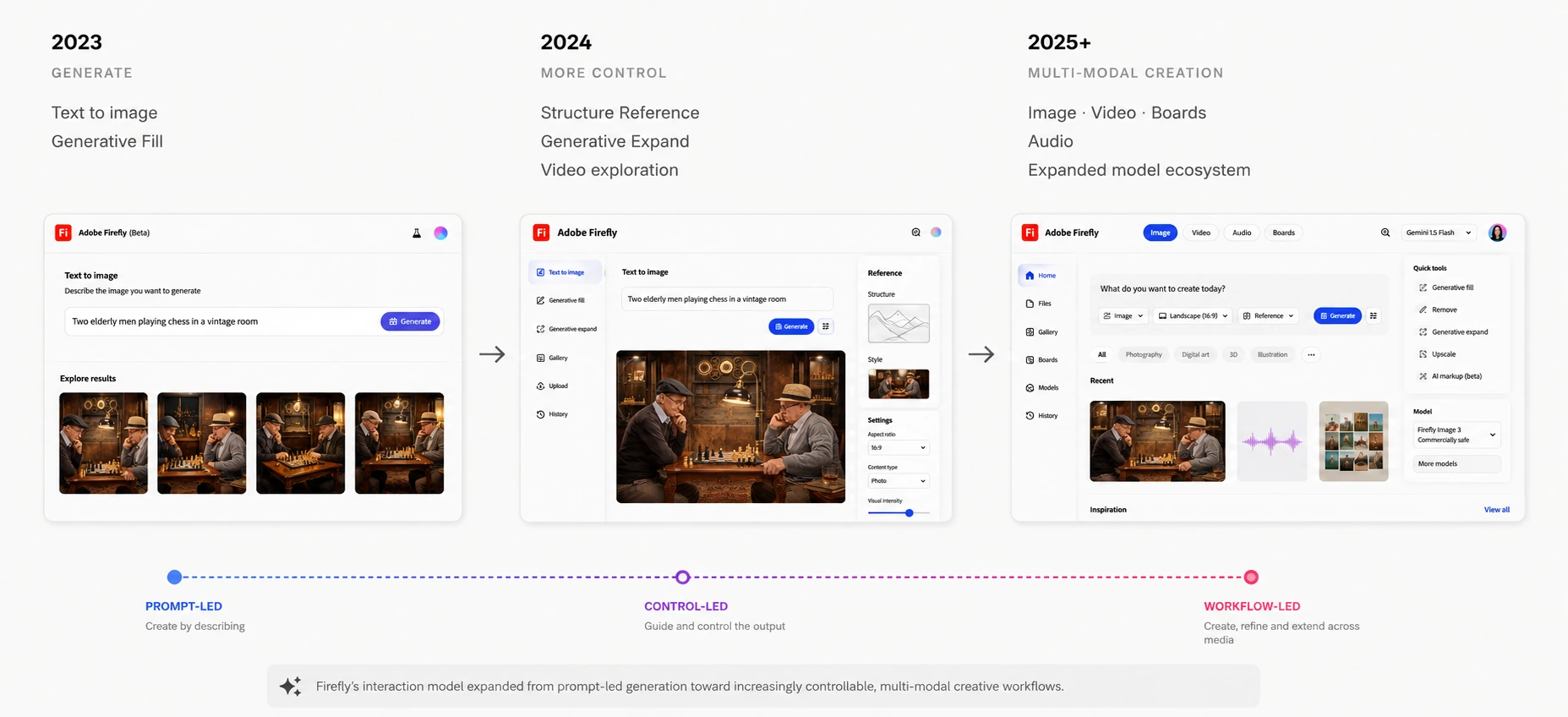
By 2024, Firefly could turn a sentence into a usable image and already shipped Generative Fill, Structure Reference and Generative Expand. Those capabilities existed before this engagement and are not mine to claim.

What was still unsettled was the interaction model for the minutes after a generation — the part of the session where a creator has something good and needs it to be right. That is the only part of Firefly this case study is about.

2023
Generate
  • Text to Image
  • Generative Fill
2024
More control
  • Structure Reference
  • Generative Expand
  • Video exploration
2025+
Multi-modal creation
  • Image · Video · Boards
  • Audio
  • Expanded model ecosystem
Timeline graphic showing Firefly evolution from generation to multi-modal creation

Problem & stakes

“I like this image.
I just don't like that part.”

adobe_two.webp
User intention
Keep 90% · Change 10%
Prompt regeneration
Potentially changes far more than the intended area

The challenge wasn't generating more. It was changing less.

What it cost the creator

  • Regeneration cost. A nearly correct output is gone the moment the prompt is rewritten.
  • Ambiguous spatial intent. Language carries what should change; it rarely carries where.
  • Iteration overload. Near-identical generations pile up and become impossible to compare or recover.

What it cost the product

  • Edit completion. Sessions ended in abandonment rather than an accepted result.
  • Retention of power creators. The people who generate the most hit the refinement ceiling first.
  • Cross-app switching. Precise work drained out of Firefly into Photoshop, and took the session with it.
adobe_three.one.webp

Recurring friction from refinement behaviours, product observations and team reviews. Four patterns, one root cause: no way to say where.

Accountability

What I owned — and what I didn't.

This was a contract engagement focused on one part of the experience. Being precise about the boundary matters more than sounding senior.

I owned

  • The interaction model for intent-first refinement Defined the loop — generate, select, instruct, refine, compare, keep — including which input takes precedence when a selection and a prompt disagree.
  • Multimodal select-and-prompt Specified region, brush and object selection bound to a natural-language instruction, and the numbered annotation that keeps the two visibly linked.
  • Variations and generation-history concepts Designed alternatives as decisions to inspect before they become permanent, and a history that exposes the instruction behind each step.
  • Validation framing Wrote the comprehension tasks, ran the sessions, and set what counted as a failure — deliberately testing understanding rather than visual preference.
  • Handoff considerations Worked the unglamorous cases with engineering: empty and multi-region selections, instructions that conflict with the selection, and which slice was buildable first.

Decisions & tradeoffs

Five decisions that shaped the work.

Each of these had a credible alternative, and each one cost something. The costs are listed because they were accepted knowingly, not because they were discovered later.

Decision 01 · Input model

We optimized for intent precision over prompt fluency.

Decision

Make spatial selection the first step of an edit, then attach language to it — rather than treating the prompt as the only channel for intent.

Alternatives considered

Stay prompt-first and invest in prompt suggestions and rewriting help. Or infer the target region from the language alone.

Why we chose this

Language reliably communicates what to change but not where. Inference failed silently — when it targeted the wrong region, creators had no way to see why or correct it, so they retyped the whole prompt.

Cost accepted

An extra step before the payoff, and slower for genuinely global edits. It also asks people to learn a selection habit in a product that trained them to type.
Decision 02 · Default behaviour

Localized edit became the default. Regenerating the frame became a deliberate act.

Decision

Resolve an edit inside the smallest region that satisfies the instruction, and demote full regeneration to an explicit, separate action.

Alternatives considered

Keep regeneration as the default with an opt-in “preserve the rest” control, or present both paths as equal choices at every edit.

Why we chose this

Preserving most of the image is the more common intent, and the destructive path should be the one you choose on purpose. Offering both equally just moved the decision cost onto the creator on every single edit.

Cost accepted

When a local result is weak, the creator has to escalate to regeneration manually, which can read as a dead end. The default also raises the bar for edge blending — a quality I was relying on the model to hold up.

Decision 03 · Depth of control

Enough Photoshop vocabulary to be legible. Not enough to become Photoshop.

Decision

Borrow exactly three selection primitives — region, brush, object — and no layers, masks or channel-level control.

Alternatives considered

Full masking and layer parity to keep professional work inside Firefly, or a single automatic object selection to keep the interface minimal.

Why we chose this

Three primitives covered nearly every edit we observed without importing a professional tool's learning curve. Firefly's advantage is speed and approachability; spending that advantage on parity would have been a bad trade.

Cost accepted

Professional creators hit a ceiling and still leave for Photoshop on fine retouching. I chose to design that exit as an intentional handoff rather than pretend to close it — which is why cross-app switching went down, not away.

Decision 04 · Scope of history

History earned its place by being readable, not by being a graph.

Decision

Ship a readable record of edits with the instruction attached to each step. Keep full branching and side-by-side lineage as a later concept, explored but not scoped into v1.

Alternatives considered

A complete non-linear branching tree in v1, or nothing beyond a conventional undo stack.

Why we chose this

In sessions, creators needed to understand how an image got here and return to an earlier direction. They did not ask to manage a graph. The branching UI carried high build cost and higher comprehension risk for a need nobody articulated.

Cost accepted

Parallel exploration stays cramped in v1, and the most compelling artifact from the exploration is the one I argued to defer.

Decision 05 · Out of scope

What I cut, and why.

Deferred

  • Refinement for video beyond stills
  • Collaborative review of variations
  • Saved prompt and style libraries
  • Model-choice guidance for creators
  • Automatic repair of weak local results

Reasoning

Every one of these widens surface area before the core refinement loop is proven. Model-choice guidance was the hardest to let go — I had explored it in depth — but it solves a different problem than “change this part,” and shipping it alongside would have blurred what we were actually testing. The one I would revisit first is automatic repair, because it sits directly on the failure path of Decision 02.

Alternatives were explored, not assumed

adobe_three.webp
prompt-only editing brush selection rectangular region object-aware selection inline annotation contextual composer generation history variation comparison

The solution

Tell Firefly what to change.
Show it where.

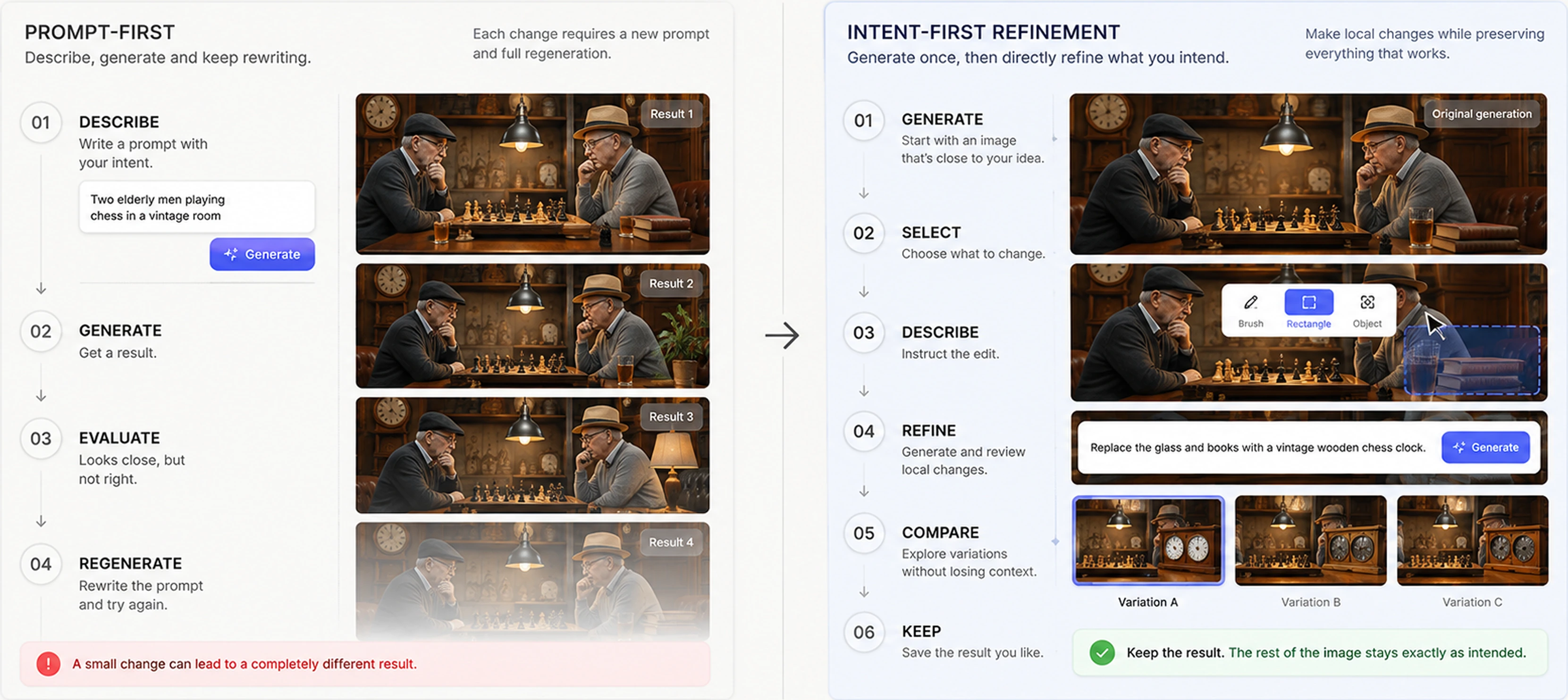
Instead of rebuilding a prompt, the creator identifies the target, describes the intended transformation, and evaluates localized alternatives. The instruction and the region stay bound together so it is always clear what the edit applies to.

01

Select

Region · Brush · Object

02

Instruct

Describe the desired change

03

Refine

Generate and evaluate contextual alternatives

Diagram comparing prompt-first and intent-first refinement interaction models

Prompt-first regenerates to get closer. Intent-first refines what already exists.

Contextual editing flow

Step 01

Start with a generation worth keeping

The subjects, composition, lighting and atmosphere already work. This is the state where regeneration is most expensive.

Step 02

Point at the part that doesn't

Region, brush or object selection marks the secondary objects to change. Everything outside the selection is a commitment, not a hope.

Step 03

Attach the instruction to the selection

A natural-language instruction is bound to the marked region and shown inside the composer, so the creator can see the pairing before generating.

“Replace the glass and books with a vintage wooden chess clock.”

Step 04

Review a local change, not a new image

Firefly returns localized alternatives while holding the rest of the composition steady — players, board, lighting, clothing, room and mood.

adobe_five.webp
adobe_six.webp
adobe_seven.webp
adobe_eight.webp

Words explain what.
Selection explains where.

Creative instructions carry spatial information that text alone expresses badly. Firefly's current AI Markup follows a related model, combining drawings and region selections with text prompts.

Brush, region, and annotation interaction patterns on a mountain landscape for communicating what to change and where

Iteration without starting over.

Alternatives are treated as decisions to inspect rather than replacements to accept. The record of edits keeps the instruction attached to each step, so a creator can understand how an image arrived here and return to an earlier direction.

adobe_ten.webp
Proposed generation history UI with versions of a drone image and a panel to revisit directions and variations

The branching exploration shown here went beyond what we scoped for v1 — see Decision 04.

Exploration should be reversible.

Validation

We tested comprehension, not preference.

Asking creators which version they liked would have told us nothing about whether the model was understandable. So the sessions tested whether people could predict what the system was about to do, and recover when it did something else.

  • Could creators tell which area the instruction applied to before generating?
  • Could they distinguish image selection from prompt input?
  • Could they recover an earlier creative direction?
  • Could they compare alternatives without losing context?
  • Did the interaction reduce the need to rewrite the full prompt?

The change this forced

Before

Selection and prompt felt visually disconnected.

Observation

The relationship between the instruction and the selected area was not explicit enough — people generated without knowing what would change.

After

Connect the selected region to a numbered annotation and surface that annotation inside the composer.

What this testing did not cover

Comprehension testing tells you whether people understand the model. It does not tell you whether they trust it after a bad result. If I had continued access, that failure path is the study I would have run next.

Impact

Less regenerating. More finishing.

The refinement model set out to reduce unnecessary regeneration, make intent easier to communicate, and get creators to an accepted result without leaving the tool.

−40% Prompt retries

−35% Full-image regenerations

−25% Time to accepted output

+30% Successful edit completion

+28% Feature adoption

+18% Week-4 retention among high-volume creators

−22% Cross-app tool switching

How to read these

These are measured outcomes from the engagement, reported for the intent-first refinement flow against the prompt-and-regenerate baseline. I did not own the instrumentation, so I present them as directional evidence for this loop rather than as a claim about Firefly overall — and I am happy to say so in an interview. What I will defend is the reasoning behind each decision above, including the costs.

Precision

Binding a spatial selection to a natural-language instruction let creators communicate localized intent without rewriting the whole prompt.

Efficiency

Localized refinement and inspectable alternatives shortened the path from first generation to an accepted result.

Continuity

Keeping refinement inside the creative workflow reduced context switching — the metric that mattered most to the product, and the one Decision 03 deliberately capped.

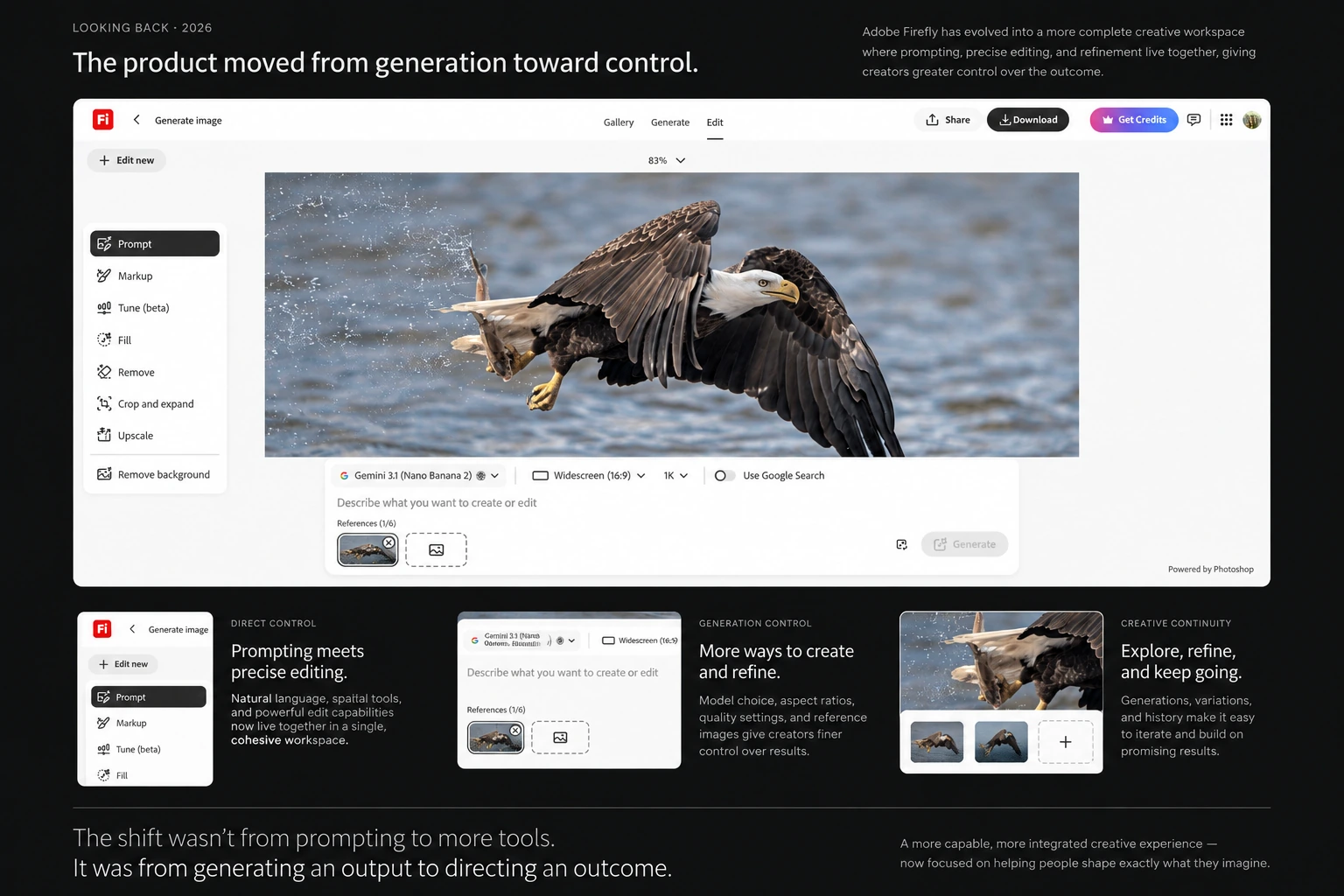
Looking back · 2026

The product moved from generation toward control.

Firefly today combines prompt-based editing with direct manipulation, markup, variations, tuning and broader media workflows. I am not claiming these shipped because of this exploration — but the direction it argued for, control after generation, is the direction the product took.

Adobe Firefly — current product, 2026

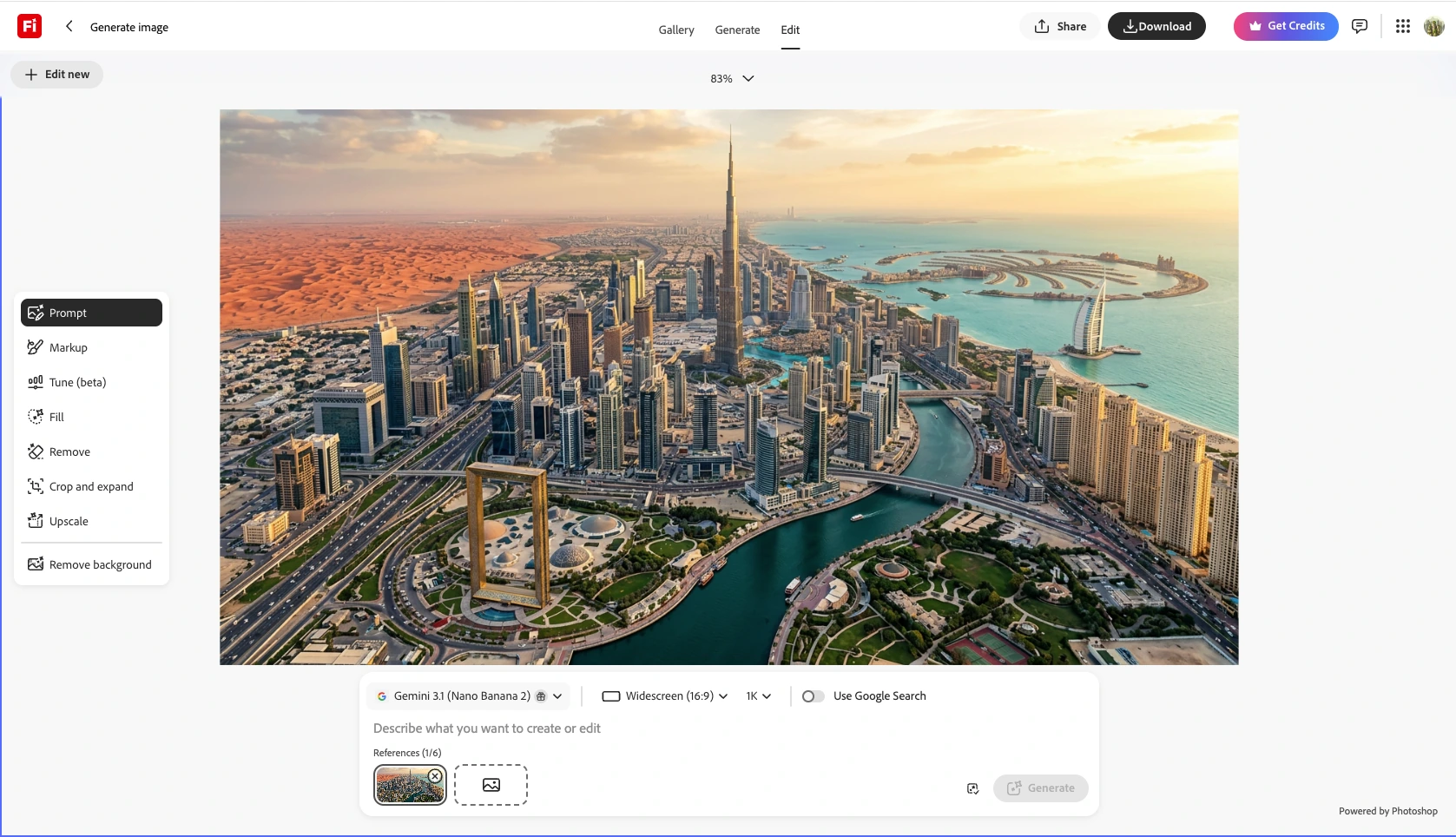
Adobe Firefly current editing experience in 2026, showing prompt, markup, tune, fill, remove, and expand tools

Adobe Firefly image editing experience — 2026.

Adobe Firefly 2026 edit controls, including markup, tune, fill, remove, and related refinement tools

Selection and markup now sit alongside the prompt rather than behind it.

Adobe Firefly 2026 workflow from image editing to image-to-video generation and continuing in Photoshop

Downstream handoff — image-to-video, and continuing work in other Adobe applications. The escape hatch from Decision 03, treated as a first-class path.

“The meaningful change wasn't that generative AI got better at making images. It was that creators gained ways to direct, constrain and refine what the AI changed.”

Creative AI should not take control away from designers. The strongest version of this product combines the speed of generation with the precision creatives already expect from their tools — which is exactly the tradeoff every decision on this page was managing.

Senior reflection

What I'd do differently.

Design the failure case first

I spent too long on the path where the local edit works. The genuinely hard problem is what a creator does when the localized result is worse than the original — and by making localized editing the default, I made that path more important, not less. It should have been in the first round of concepts, not deferred.

Define the metrics before the visuals

I designed the interaction and then reached for numbers to support it. Agreeing up front on what “successful edit completion” actually counts would have made the tradeoff conversations sharper, and would have let me speak about the results with more authority than I can now.

Treat the Photoshop handoff as a feature, not an admission

I framed leaving Firefly for fine retouching as a limitation to minimize. It is a real workflow with real value, and designing it deliberately — carrying the selection, instruction and history across — would have been a stronger answer than trying to reduce the number.