Official Project • Enterprise UX • Workflow Optimization

AI-Assisted PDP Workflow Redesign
for Enterprise E-commerce

While working with the University of Utah Campus Store, I collaborated with Campus Store employees, Campus Store NetSuite admins, and the official NetSuite team to identify significant friction in the Oracle NetSuite PDP publishing workflow. Through stakeholder interviews and usability testing with 20 internal users, I led the UX redesign initiative to optimize the publishing experience, reducing average completion time from 30–40 minutes to under 10 minutes.

Organization University of Utah Campus Store
Platform Oracle NetSuite ERP
Project Type Official Enterprise UX Project
Role Senior UX Designer
Duration 12 Weeks
Stakeholders Campus Store Employees, NetSuite Admins, Official NetSuite Team, Content Creators
Methods Interviews, Workflow Analysis, Prototyping

Problem

Publishing a single product detail page in NetSuite meant jumping across 6+ tabs, hunting for image paths in File Cabinet, and double-checking configuration in multiple places. Content teams spent 30–40 minutes per SKU and still relied on admins to fix mistakes after going live.

Goal

Collapse the fragmented ERP-driven workflow into one guided PDP Studio that lets merchandisers create, enrich, and validate a SKU in under 10 minutes — without needing a mental map of NetSuite’s underlying architecture.

Solution

Introduced a step-based Guided Product Builder, integrated Smart Image Studio for in-context media management, added an embedded AI content panel, and paired it with live storefront preview and a PDP Quality Score to surface gaps before publish.

Impact

Reduced average completion time from 30–40 minutes to 9.8 minutes, removed tab switching, and increased first-attempt task completion to 80% — translating into ~0.45 FTE weekly productivity gain for the publishing team.

PDP storefront preview — NetSuite publishing workflow in motion.

20 Internal Users Tested
30–40 min → 9.8 min Average completion time
70% Reduction in tab switching
80% First-attempt task completion
16+ hours Saved weekly (projected)

About the environment

The University of Utah Campus Store manages product listings through Oracle NetSuite's PDP system. Each SKU requires manual input across multiple tabs, including content, media, pricing, and web configuration.

The merchandising team, admins, and developers all interact with this system daily to maintain revenue-generating product listings for the university's e-commerce platform.

Organization University of Utah Campus Store
Platform Oracle NetSuite (ERP + E-commerce)
Users Merchandising team, Admins, Developers
Business Relevance Revenue-generating product listings
User
NetSuite
Web Store
Customer

ERP Architecture vs Publishing Workflow

Fragmented Publishing Architecture

Why the current PDP workflow creates friction

The current NetSuite PDP architecture distributes publishing tasks across multiple system-level tabs. While this structure aligns with ERP data modeling, it conflicts with how merchandising teams think and work.

From workflow observation across 12 SKU publishing sessions and 20 internal users, the average PDP completion required:

  • 18+ tab switches
  • 32.4 minutes per SKU
  • 3–5 minutes locating image paths
  • 2–3 validation revisits before final save

Below is a structural breakdown.

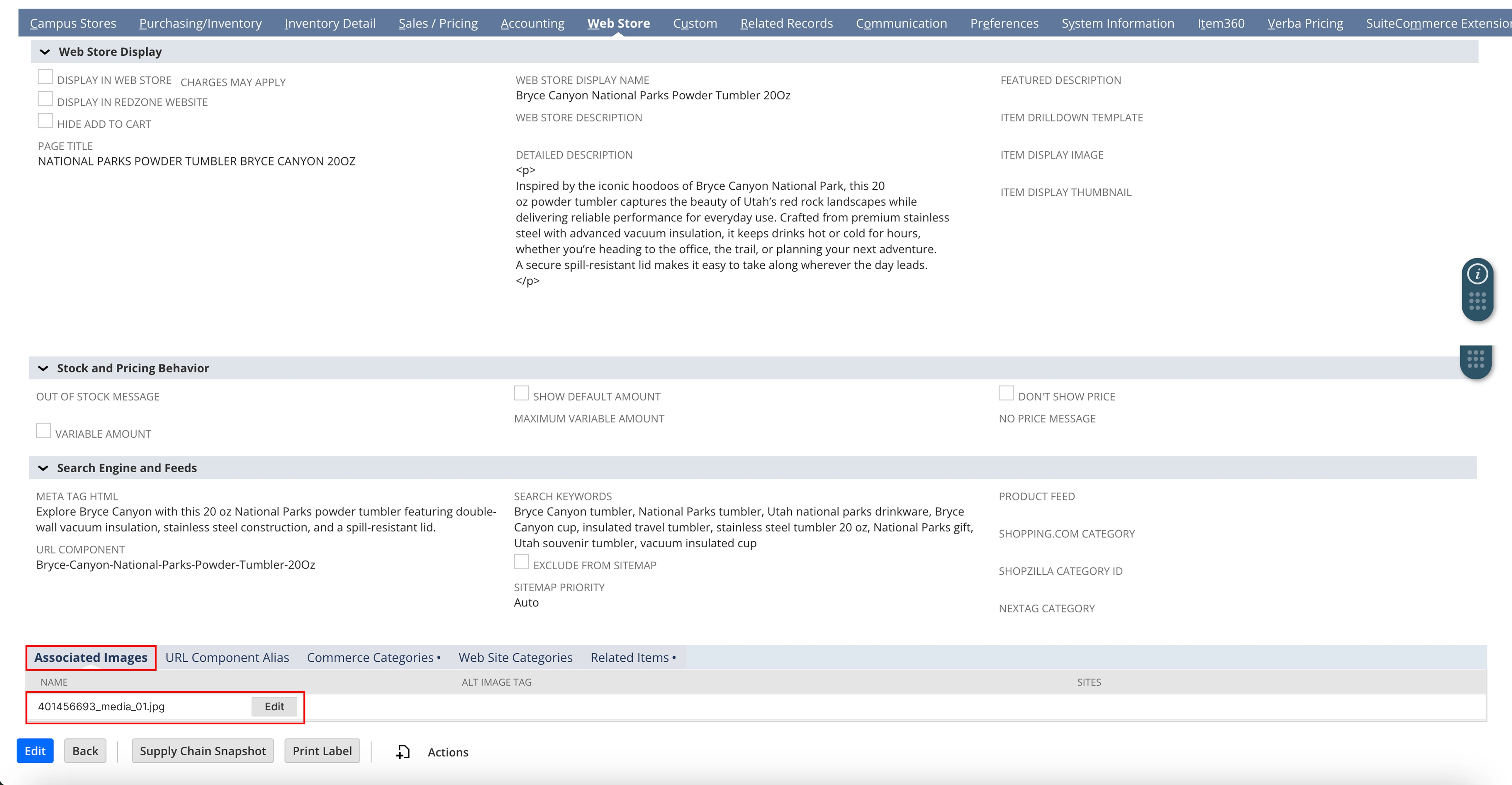
Existing NetSuite PDP screen — publishing spread across tabs and external media workflow.

1

Campus Stores Tab

Visibility is in a separate tab — users finish content but forget to enable “Display in Web Store.”

4/12 forgot to enable display → products stayed hidden.

2

Web Store Tab

Content lives here; media and categories live elsewhere. No preview before publish.

Publish-blind → anxiety, rework, inconsistent formatting.

3

Custom Tab

Commerce categories and key metadata hidden under a generic “Custom” label.

3 users needed help finding categories → misclassification, SEO dilution.

4

Related Records Tab

Cross-sell and bundles are isolated; they feel optional, not part of publishing.

Only 40% of SKUs had related items configured → missed upsell.

5

SuiteCommerce Extension Tab

Technical storefront logic mixed into the flow — non-technical users avoid it.

Over-reliance on devs, slower iteration.

6

File Cabinet

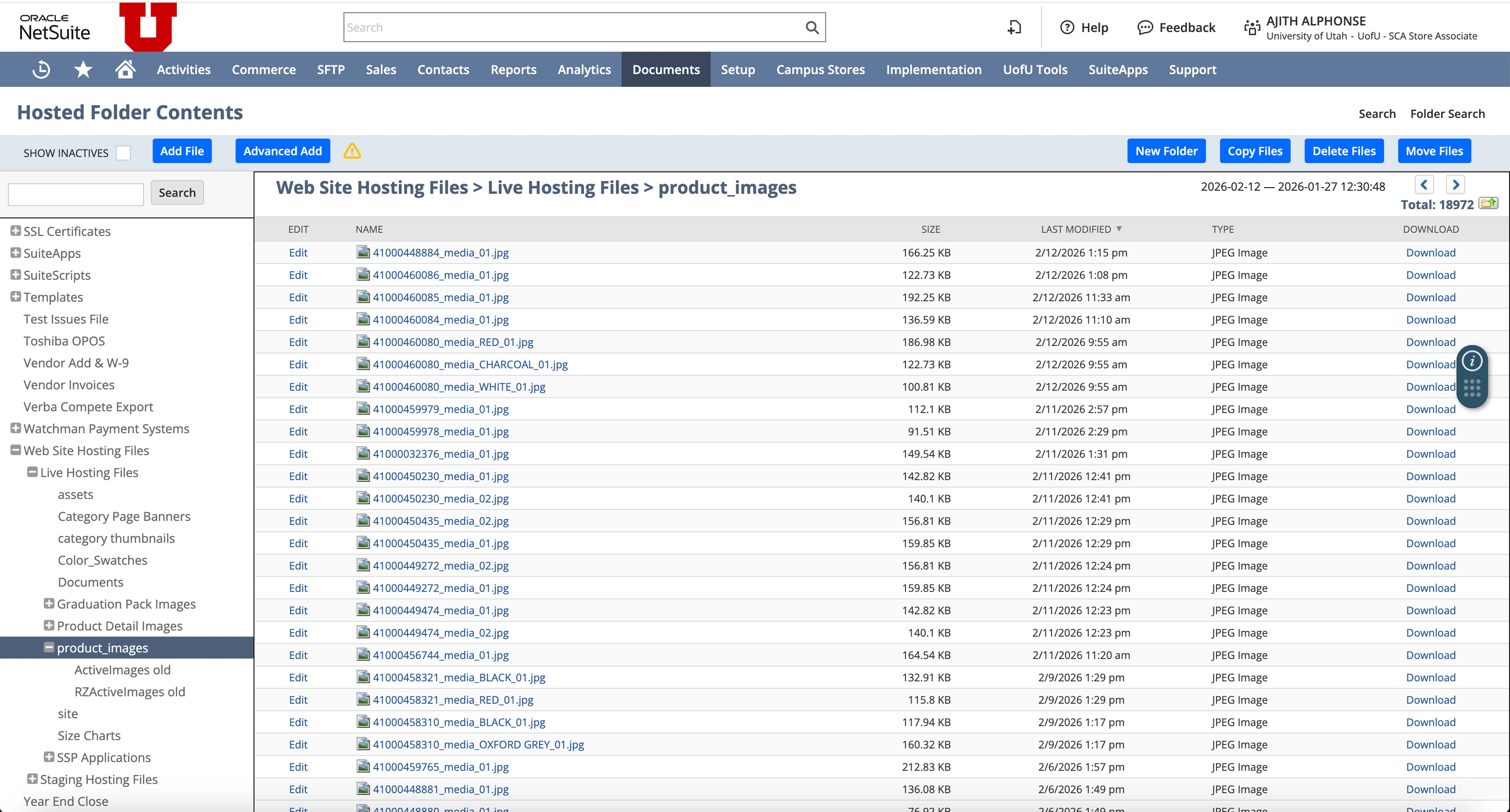
Images live outside the PDP. Upload → copy path → return → paste. Context break every time.

3–5 min per SKU on images; broken links in 2 sessions.

Media Workflow — Before

How image uploading created friction in the publishing flow.

NetSuite File Cabinet — folder list view
NetSuite File Cabinet (folder list view)
Associated Images tab — no visual preview state
Associated Images tab (no visual preview)

Existing process

  1. Leave PDP
  2. Navigate to File Cabinet
  3. Search by SKU
  4. Upload file
  5. Copy reference
  6. Return to PDP
  7. Paste image link
  8. Save
  9. Re-check

Observed friction

  • 3–5 minutes per SKU
  • No visual confirmation
  • Broken image references
  • Constant context switching
  • No image placement preview

System-Level Pattern Identified

Across all tabs, the pattern is consistent:

ERP structure

Inventory → Pricing → Web → Custom → Extensions

vs

User mental model

Create product → Add content → Add images → Configure pricing → Preview → Publish

These two models do not align. That misalignment is the root friction.

Current flow

User Campus Store Web Store Custom File Cabinet SuiteCommerce Back to Web Store Publish

18+ navigation transitions per SKU

Understanding the workflow

Research Methods

Workflow Observation
Stakeholder Interviews
Usability Testing
Competitive Benchmarking

Usability Testing Setup

Participants (20 total)

  • 8 content uploaders
  • 6 merchandisers
  • 4 admins
  • 2 developers

Task

Create and prepare a new SKU for publishing.

Measured

  • Completion time
  • Task errors
  • Assistance required
  • Confidence level post-task

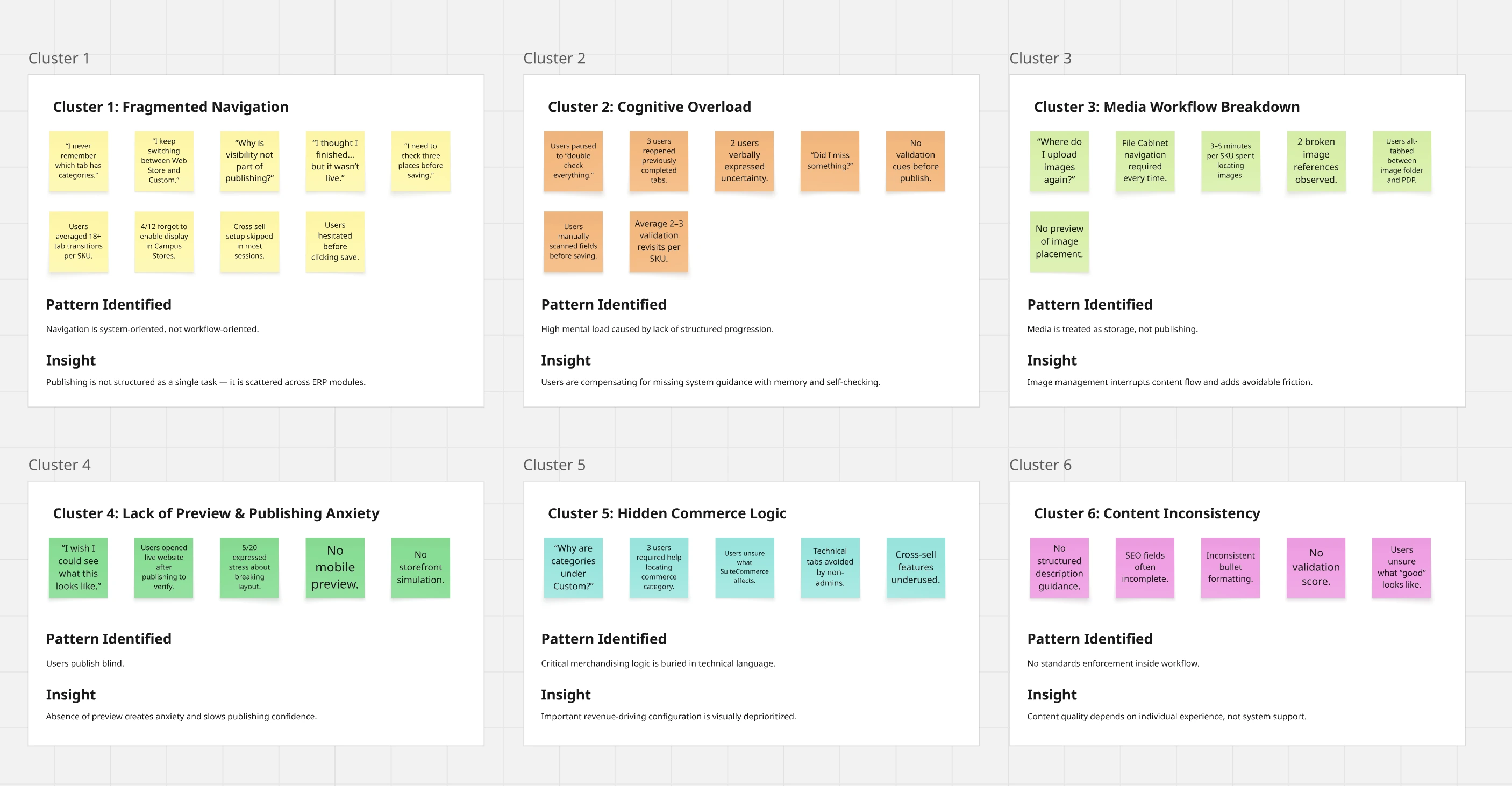
Affinity Map

Affinity map from research synthesis — insight clusters

Research Findings

20 users, 12 SKU sessions → four structural issues.

1

Fragmented publishing

6+ tabs and external file storage for one task. ERP structure ≠ publishing workflow.

18+ nav transitions per SKU
2

Missing guidance

No structured progression or validation — users double-check and revisit tabs before saving.

2–3 validation revisits per SKU
3

Media breaks flow

Images live in File Cabinet; users exit PDP, upload, copy path, return. Task continuity broken.

3–5 min per SKU + broken refs
4

No preview = anxiety

Can’t see storefront before publish. Many check the live site after to verify.

5/20 stressed about breaking layout

Design Principles Derived from Research

Based on the findings, I established the following principles to guide the redesign:

Translating Research into Product Decisions

Finding → Solution mapping:

Fragmented Navigation Guided Product Builder (step-based flow)
Cognitive Overload Structured progression + Quality Score
Media Breakdown Smart Image Studio inside PDP
Lack of Preview Live Desktop + Mobile Preview
Hidden Commerce Logic Unified layout with visible categories

How might we reduce PDP publishing time while improving content consistency and conversion readiness within enterprise constraints?

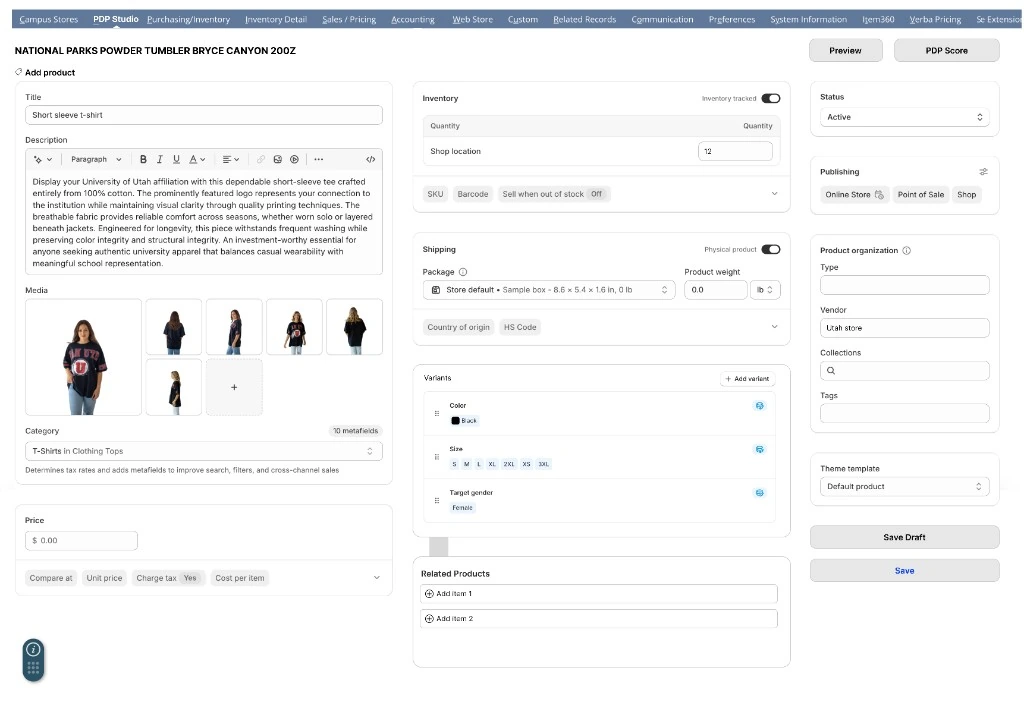
AI-Assisted Product Publishing Studio

A redesigned workflow that transforms the tab-heavy interface into an intelligent, guided publishing experience.

Guided Workflow

Step-based flow replacing fragmented tab navigation

AI Content Generator

Intelligent content assistance for descriptions and SEO

Smart Image Studio

Visual-first media management with enhancement tools

PDP Quality Score

Dynamic validation ensuring listing completeness

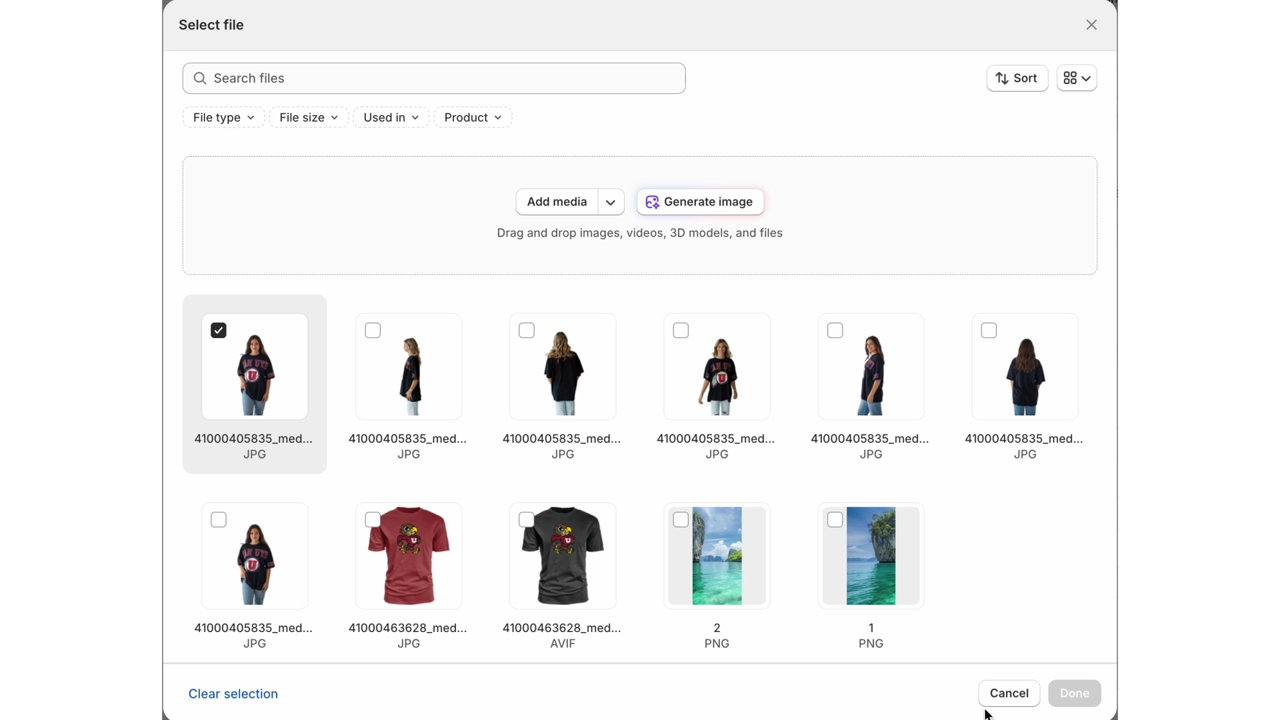
Smart Image Studio — Integrated Media Flow

Instead of treating media as file storage, the system treats media as part of publishing.

Key changes

  • Drag-and-drop upload directly inside PDP
  • Auto-save to File Cabinet in the background
  • Visual grid preview
  • Reorder via drag interaction
  • Primary image selection
  • Desktop & mobile preview simulation

Images are uploaded contextually and stored programmatically — without interrupting the publishing workflow.

From File Management → To Visual Storytelling

Before: File Cabinet workflow Before: Associated Images tab

Existing NetSuite File Cabinet & Associated Images workflow — file-based assets, manual linking, and no visual preview.

After: Smart Image Studio grid

Redesigned PDP Studio media flow — Smart Image Studio grid with in-context upload, preview, and visual storytelling.

Design solutions in detail

Each feature directly responds to a specific structural problem uncovered in research.

01

Guided Product Builder

Addresses: fragmented navigation & cognitive overload.

Problem: 6+ tabs and 18+ transitions required to publish a single SKU.

Design decision: Step-based PDP Studio aligned to user flow: Create → Media → Content → Pricing → Preview → Publish.

Why this matters: Makes publishing linear, predictable, and removes hidden configuration steps.

Measured outcome: 70% fewer tab switches, 80% first-attempt completion.

02

AI Content Generator

Addresses: manual writing & content inconsistency.

Problem: Descriptions were manually written with no structure or guidance.

Design decision: Embedded a contextual AI panel directly inside the description area.

Why this matters: Speeds up writing while keeping editors fully in control of tone and accuracy.

Measured outcome: Noticeably lower content-writing time across usability sessions.

03

Smart Image Studio

Addresses: media workflow breakdown.

Problem: Image upload lived in File Cabinet, forcing users to leave the PDP mid-flow.

Design decision: Drag-and-drop image manager integrated directly into PDP Studio.

Why this matters: Keeps users in one place, reduces context switching, and centralizes media quality.

Measured outcome: 3–5 minutes saved per SKU on image handling.

04

Template + Live Preview

Addresses: publishing anxiety.

Problem: Users published blind, then checked the live site to see if layout broke.

Design decision: Split-view PDP + storefront preview that updates in real time.

Why this matters: Turns publishing into a validated step instead of a risky push to production.

05

PDP Quality Score

Addresses: lack of validation.

Problem: No enforcement of completeness or quality before publishing.

Design decision: Real-time score plus checklist tied to must-have content and media.

Why this matters: Moves validation from “remember everything” to a clear, system-guided finish line.

Measured outcome: 80% first-attempt task completion.

06

File Cabinet Optimization

Addresses: asset discoverability & governance.

Problem: Media lived as unstructured folders, leading to duplicate uploads, hard-to-find assets, and broken references across SKUs.

Design decision: Auto-save uploaded assets into structured, SKU-linked storage with consistent naming, metadata, and “select existing” search inside PDP Studio.

Why this matters: Improves reuse, reduces errors, and keeps media management aligned with publishing—not file hunting.

Measured outcome: Fewer duplicate uploads and faster asset retrieval during usability sessions.

The transformation

Before

  • Avg completion: 32.4 min
  • Tab switches: 18+
  • Preview: None
  • Admin correction rate: 65%
  • Quality validation: None

After

Redesigned NetSuite PDP Studio interface
  • Avg completion: 9.8 min
  • Tab switches: Zero
  • Preview: Live preview included
  • Assistance required: 20% (80% completed independently)
  • Quality validation: Real-time scoring

Quantified productivity gains

Average time saved per SKU ~22 minutes
×
Team publishes per week 50 SKUs
=
1,100 minutes Saved weekly
18.3 hours Weekly time savings
0.45 FTE Productivity gain equivalent
70% Reduction in tab switching
80% First-attempt completion rate
65% → 20% Admin correction rate reduction

* Calculations based on usability testing results with 20 internal users and workflow analysis.

Working within enterprise reality

Designing for enterprise means respecting existing architecture while delivering meaningful improvements.

Overlay Integration Model

Solution operates as a layer on top of existing NetSuite, not a replacement.

API-Based AI Integration

AI features connect via API, keeping core ERP data separate and secure.

Role-Based Permissions

Existing permission structures maintained for compliance and security.

Non-Disruptive Architecture

No changes to core ERP data architecture or existing workflows.

Why we didn't migrate to Shopify

Instead of replacing the system, we optimized the publishing layer within existing constraints.

Migration Cost

Full platform migration would require significant investment in data migration, retraining, and potential downtime.

ERP Dependency

NetSuite serves as the core ERP system managing inventory, accounting, and financial operations—not just e-commerce.

Accounting Integration

Deep integration with university accounting systems would require extensive reconfiguration and testing.

Custom Workflows

Existing custom workflows and business rules built over years would need to be rebuilt or abandoned.

The strategic approach: Rather than replacing the system, we optimized the publishing layer—delivering immediate productivity gains while preserving existing infrastructure and workflows.

Key learnings

This project reinforced that in enterprise systems, value comes not from visual modernization but from reducing operational inefficiencies. Designing within ERP constraints required balancing technical feasibility, stakeholder alignment, and measurable productivity impact.
01

Operational Efficiency Over Aesthetics

In enterprise contexts, reducing cognitive friction and workflow inefficiencies delivers greater business value than visual refresh alone.

02

Constraint-Driven Innovation

Working within existing system boundaries requires creative solutions that respect technical architecture while delivering meaningful improvements.

03

AI as Augmentation Tool

AI should enhance human decision-making and reduce manual effort, not replace user agency. Maintaining user control is essential for trust and adoption.

04

Quantified Impact Matters

Translating design improvements into measurable productivity gains (FTE equivalency, time savings) creates stronger stakeholder buy-in and demonstrates clear ROI.

What I'd improve next

Senior designers always show iteration mindset. Here's the roadmap for continued optimization.

Full Visual Media Grid

Enhanced image management with drag-and-drop reordering, batch operations, and visual preview of image sequences.

Automated Alt-Text Generation

AI-powered accessibility improvements with automatic alt-text generation for images based on content analysis.

Integrated SEO Scoring

Real-time SEO optimization suggestions with scoring system that guides users toward search-friendly content.

Template-Based PDP Variations

Pre-configured templates for different product categories (apparel, electronics, books) with category-specific field requirements.